

A guide to updating your address with HMRC & Companies House
If you move or decide to take up an alternative address (such as Mighty's registered office address with Hoxton Mix), you'll want to ensure this address is updated with HMRC and Companies House to ensure you continue to receive important letters going forward.
In this guide, we'll walkthrough how to do this:
Companies House:
Within Companies House, both the company's registered office address and the director's correspondence address will be publicly listed, so it's likely you'll want to change both of these. You can update these online via this link. This will require you to sign into your Companies House WebFiling account (which is the same account you'll use to file confirmation statements). You'll need the email address and password that you used to sign up for the Companies House and your Companies House authentication code. Your authentication code should be found within Mighty, by navigating to Company Settings > HMRC & Taxes.
Once logged in, follow these steps:
1. Click on ‘WebFiling’ and enter your company number and tick where the company was registered. You may also be asked for your Companies House authentication code, which you can find within Mighty by navigating to Company Settings > HMRC & Taxes, and then scroll down to the Companies House section at the bottom where you'll find your Companies House Authentication Code (the company number will also be here if you need it). You can then click Confirm and continue, to confirm the company is correct (or click 'choose a different company' if it isn't).
2. You'll then be within the 'WebFiling' section for your company. At the top of the screen, you'll see your current registered office address and next to it, there's a button to 'change address', as shown below:

3. Once here, you can simply lookup the address and submit the changes.
4. Next, as a director, you may also want to update your correspondence address which also appears. Back on the WebFiling screen, you'll see the Persons with Significant Control (i.e. +25% shareholders) and directors listed further down. You can then update this address by clicking either of the 'Edit' buttons shown below in the yellow borders:
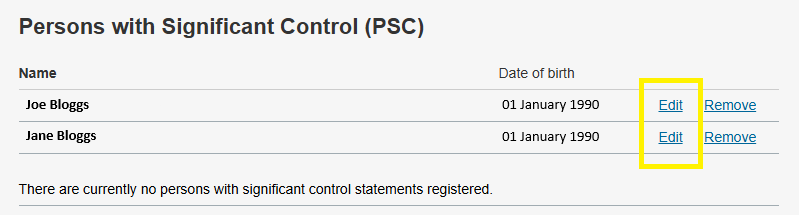
Once you hit edit, you'll have the option to update the correspondence address and personal address. The former is the one that is listed on Companies House, so this is commonly updated if you're using a third-party address such as Hoxton Mix.
As Mighty pulls your address information from Companies House, this will update automatically, so you won't need to update this.
HMRC:
Unfortunately when it comes to HMRC, you'll need to update your address for all of the relevant taxes that you are registered for. Commonly for Mighty clients, this could include:
- PAYE for Employers
- VAT
- Self-Assessment (although, this will be within your personal government gateway login)
For Corporation Tax, this is updated automatically once you have updated your address with Companies House, although, it can take anywhere from a few days to a couple of weeks to be reflected within your HMRC account.
Fortunately, no paper forms are required and these can be updated online. We'll run through the steps below:
- First, you'll need to login to your government gateway account (linked here).
- Once logged in, you'll see an option for 'Manage account' on the top bar (shown within the yellow border below):If you click this, you'll then have an option to 'view or change your business tax details' (as shown in the yellow border below):

Once you click this, under each tax, you'll see the business details including addresses, so you can change these.
Tip: To note if you can't see any taxes in your government gateway account, bar Self-Assessment, which we cover in the next paragraph, it might be that these taxes aren't yet linked to your government gateway account. See a guide here on how you can add them for PAYE, but the same process applies to VAT and Corporation Tax.
For Self-Assessment, it's common that you'll have a government gateway account for your business and then a separate government gateway for you personally. If so, you'll need to login to the latter to update your address for Self-Assessment.
If you have any questions with updating your address, please contact our support team (support@mightyaccounting.com).