

How to Update the Bank Details on an Invoice
One of the most important parts of running a busy is: getting paid! Therefore, it's important to make sure you have the correct bank details on your invoices. To ensure these pull through correctly, you can:
Ensure the correct bank account is selected:
If you have multiple bank accounts, you will need to ensure the correct bank account is selected as your default for invoices. You can do this by going into settings (by clicking the initial in the top right hand corner), clicking ‘Invoice’ and then selecting the correct bank account in the bank account drop down.
Update the bank details manually if needed:
If you have a bank feed set-up, the basic bank details like account number and sort code should automatically populate. However, if these aren't showing correctly on your invoice, go into the bank account via bookkeeping, and then click the 3 dots and ‘edit bank details’ as shown below:
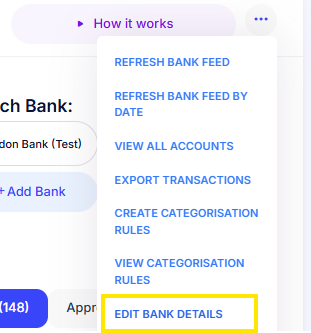
From here, you can update:
- Account holder name - this will be the name of your business and will pull onto the invoice (e.g. ABC Consulting Limited)
- Internal Mighty account name - this is simply the name that will appear within Mighty whenever you're selecting the bank (so it can help differentiate bank accounts with the same bank e.g. ‘main’, ‘deposit’ etc.).
- Account number
- Sort code
- There will also be other fields if this is a non-UK bank account e.g. IBAN, address etc.
Update the bank details only for certain customers:
You may have some clients you want to make payments to an alternative bank account to your default bank - a common example being non-UK clients paying into a Wise account, for example. Within Mighty, this is easy to manage as you can click into sales > customers and then select the relevant customer. Here, you can select an alternative bank account (and you can also select default VAT rates and currencies if relevant too!).
Feel free to reach out to us (support@mightyaccounting.com) if you have any questions with this.