

Need to credit note an invoice in Mighty? In this article we'll cover when and how to do this.
Mistakes can happen in every walk of life and invoicing clients is no exception. However, these mistakes can easily be corrected within Mighty, sometimes by use of a 'credit note'. Therefore, in this article, we'll cover off when credit notes are needed and if so, how you raise them within Mighty.
When to Raise a Credit Note?
Before covering how to raise a credit note, it's worth covering when you need to raise a credit note. If you know this is already required, feel free to skip down to the how to raise a credit note section.
By UK law, if you have mistakenly invoiced your client too much, you must correct this by issuing a 'credit note'. As the name suggests, credit note effectively work by crediting off an element (or the entirety) of an invoice.
Example: If you issued an invoice for £2,000 to your client, but later realised after it was sent that it should have been £1,800, you can correct this by issuing a £200 credit note. This would be the case regardless of whether it was paid or not, but if it was paid in full, the additional step would be to repay the £200 to your client.
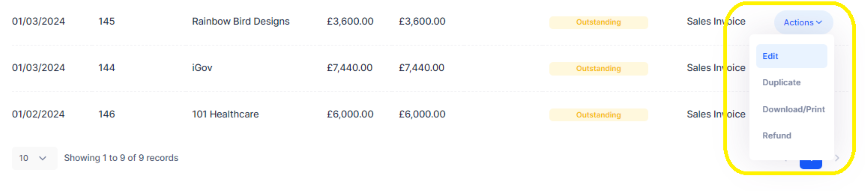
Alternatively, if you have made a mistake on an invoice within Mighty but you haven't actually sent the invoice to your client, you can simply edit or delete it as appropriate. This is easy to do within Mighty, as from the invoices screen you can click actions > edit, as shown in the yellow border below:
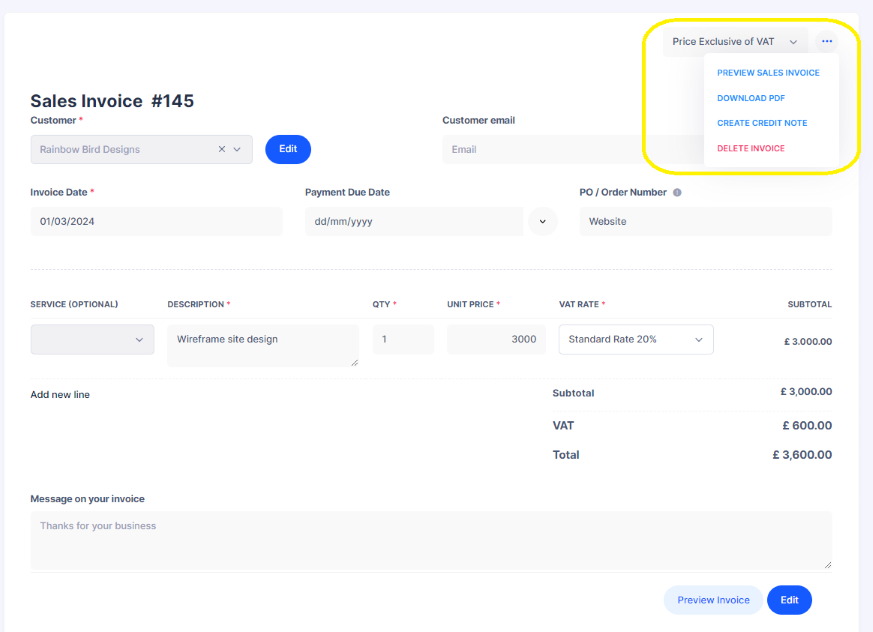
This effectively moves the invoice back to a 'draft' state, where you can edit it, or delete it. The latter of which you can access by clicking the 3 dots in the top right and then clicking delete invoice, as shown in the yellow border below:
How to Raise a Credit Note?
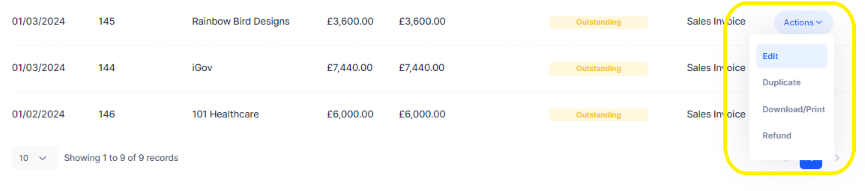
If you have sent an invoice to a client that has a mistake on it that you need to credit, you can correct this by navigating to the invoice within the sales invoices section and clicking the 'action' button and then 'edit' in the dropdown, as shown in the yellow border below:
This will then take you into the invoice itself, where you can click the 3 dot icon at the top right and then 'create credit note' within the dropdown, as shown in the yellow border below:
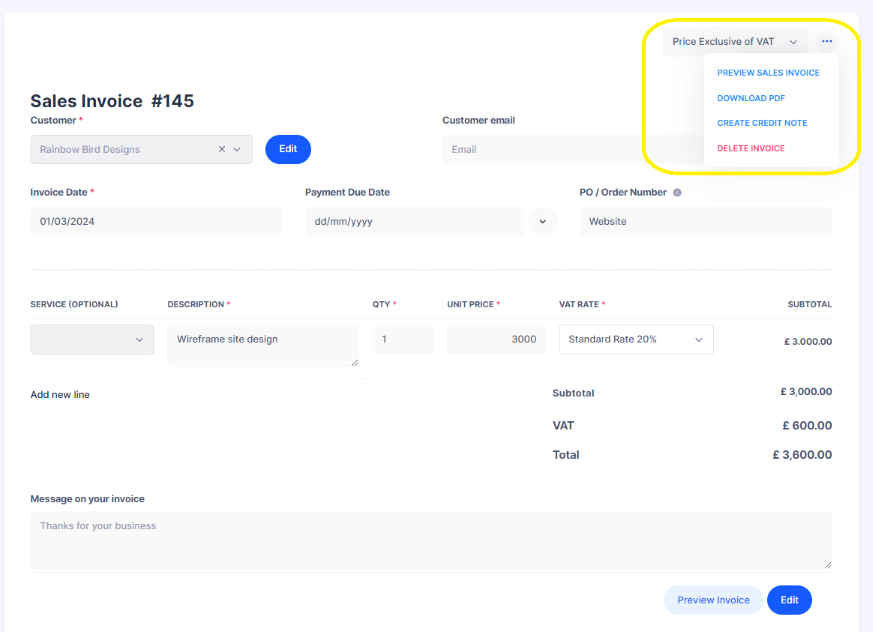
This will then take you into the credit note screen. Here, you'll be able to effectively 'credit' off the amount invoiced in error. For example, the above invoice initially invoiced £3,000 net. Let's say it was actually £2,500 net that was agreed, you could credit note this element off below as illustrated in the below screen:
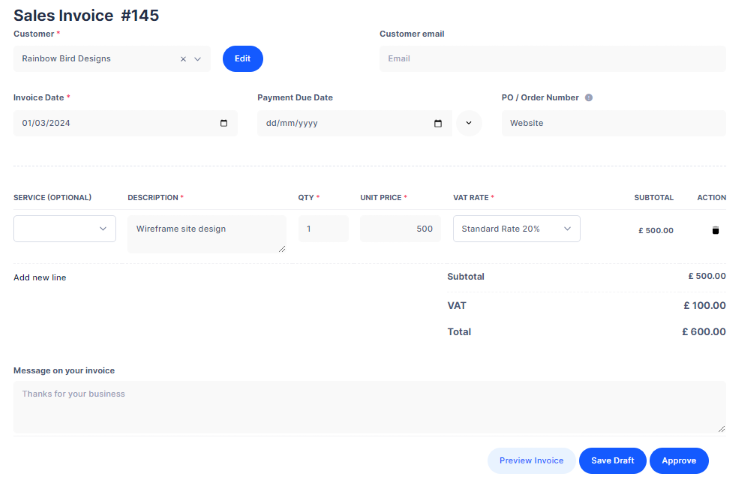
Once you hit approve, this will then record the credit note within Mighty that you can send on to your client.
Alternatively, if you need to credit note several invoices, so the credit note doesn't necessarily relate to one invoice, you can simply navigate to the sales invoices screen and click the 3 dot icon and then click 'create credit note' in the dropdown, as shown in the yellow border below:

Hopefully this all makes sense, but please contact support (support@mightyaccounting.com) if you have any questions.
FAQs:
How does this impact my VAT?
If you are VAT registered and raise a credit note, this effectively reduces the VAT you have charged your client, as and such, the VAT that you will owe to HMRC for the VAT quarter. There's no additional steps required here - Mighty will automatically account for the credit note in your next VAT return.
How do I record the payments in my bookkeeping section?
This will depend on how you were paid. If you were paid for the original invoice in full, you can categorise the full payment to the sales invoice as normal. Then, for the payment back to the client, you'll be able to categorise this to the credit note. This is done in the same manner as matching payments to sales invoices, by clicking on sales revenue and then matching the payment out to the credit note.
If you were paid the correct amount in one go (i.e. the invoice less the credit note), you'll be able to again, navigate to sales revenue when categorising, but instead clicking 'split payment to existing invoices'. Here, in the payment amount boxes, you can type the full amount of the original invoice next to that, and then the full (negative) figure next to the credit note.
What if I have under-invoiced a client?
If you have invoiced your client too little, the easiest way to resolve this would be to simply issue another invoice for the balancing amount, as opposed to credit noting the original invoice to invoice the full amount. Although, technically, either method would result in the same outcome.
Hopefully this all makes sense, but please contact support (support@mightyaccounting.com) if you have any questions.