

VAT-only invoices are sometimes necessary when you have already invoiced a client without VAT, as you were awaiting your VAT number, but now that it has arrived, you need to invoice them again to recover the VAT. This is commonly referred to as a 'VAT invoice' and in this article, we'll explain how to raise them in Mighty.
Tip: If you're yet to invoice your client then there's a recommended alternative to 'VAT-only' invoices if you're yet to invoice, which is to uplift your invoice by the amount of VAT you will charge, and then issue an updated invoice once your VAT number is received. This is covered in more detail within this article.
Raising VAT-Only Invoices:
Let's say you have already sent an invoice for £1,000 without VAT, but now you have received your VAT number, you need to send a 'VAT-only' invoice for £200. Fortunately, in Mighty, this is easy to do, as we'll outline below.
Adding Your VAT Details to Mighty:
Firstly, you'll need to add in your VAT details (which can be found on your certificate) into the below fields within Mighty which can be found within the Settings > HMRC & Taxes tab:
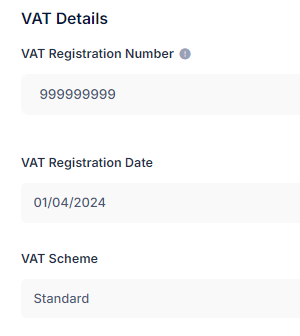
This then ensures your VAT number will be added to your invoices going forward.
Raising a VAT-Only Invoice:
Then, you'll just need to create an invoice as normal, but select 'VAT Only' in the dropdown in the right hand corner, as shown in the yellow border below:
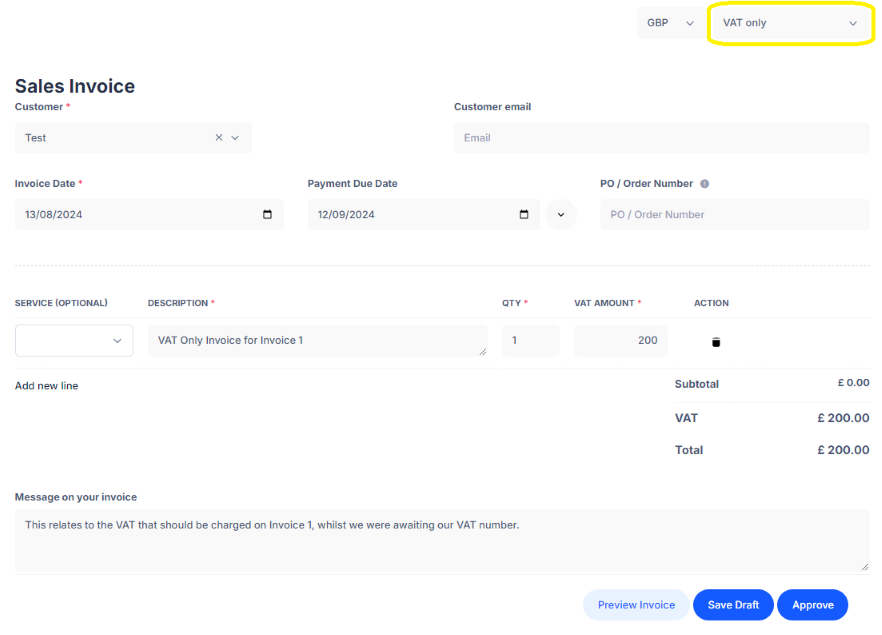
You may want to reference the invoice number(s) that you are charging VAT for within the invoice message and the description. It's worth noting, you can send a VAT-only invoice for multiple invoices (providing they're with the same client!) at the same time, so no need to do these separately unless your client specifically requests that you do.
Once done, you can simply hit approve and send on to your client. This will effectively ensure you have both charged and recovered VAT, and this can be reflected accordingly in your next VAT return.
Tip: It's worth noting, for the invoices you've sent so far without VAT, you'll need to ensure that the VAT rate on these are 'Zero Rate 0%' - this just ensures that they appear correctly on your VAT return within Box 6. 'No VAT' invoices are deemed outside the scope of VAT, so these invoices totals wouldn't appear. However, we'll do a full review for you before the VAT return is prepared/filed.
Hopefully this makes sense, but please reach out to support@mightyaccounting.com if you have any questions.