

A 3-step guide to linking adding your Corporation Tax account into your Government Gateway

When accounts are filed via Mighty, they are filed to the government gateway credentials that you have added into Mighty. However, these will only be accepted by HMRC if they can see a Corporation Tax account linked to these government gateway credentials.
Therefore, it's important to ensure that your Corporation Tax account is linked to your HMRC government gateway account. In this short article, we'll talk through how to check this, and add your Corporation Tax account if it isn't linked.
Step 1 - Check if Your Corporation Tax & Government Gateway Are Linked:
If you can see a section for Corporation Tax when you log into your government gateway account, this will be linked so no need to read any further.
If you can't see a Corporation Tax section in your government gateway, you will need to follow steps 2-4.
Step 2 - Request an Activation Code:
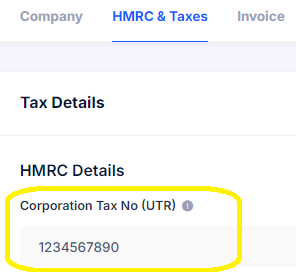
You'll firstly need your company Unique Tax Reference (UTR) which will have been sent to you shortly after you incorporated your business. If you joined us from another accountant, we would have requested this from your previous accountant and added this into Mighty's Settings for you (Settings > HMRC & Taxes), and then shown in the box within the yellow border below):
Note on your UTR: If you have registered for Self-Assessment, it's worth noting that you'll have both a company UTR and a personal UTR, so it's important not to confuse the two. It's the company UTR that is required to get access to your Corporation Tax account.
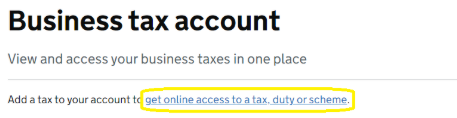
Once you have your UTR, you can login to your government gateway account and click 'get online access to a tax, duty or scheme' as shown in the yellow border below:
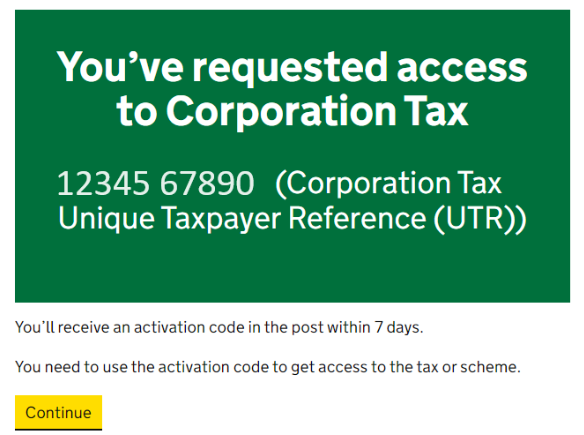
Within here, you can click Corporation Tax and then follow the steps. You'll then see the following screen:
Step 3: Enter Activation Code:
Once your activation code has arrived, you will be able to activate this within your Government Gateway account. When you log in, you'll see under Corporation Tax, there is now an option to "activate your Corporation Tax" as shown within the yellow border below:
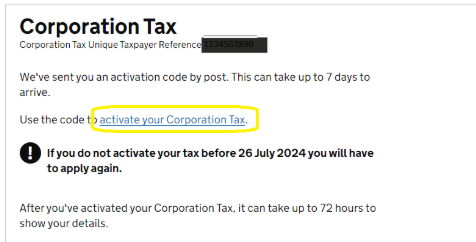
Simply click this button, enter the activation code you've received, and this will add Corporation Tax to your government gateway.
This will allow you to view your Corporation Tax account, including outstanding payments, liabilities, payment references etc. However, most importantly, it will also allow you to file your accounts via Mighty.
If you have any questions with this, please contact support (support@mightyaccounting.com).