

There could be a few reasons why you might have raised sales invoices outside of Mighty, such as:
- You've joined us mid-year
- You use a client's timesheet system
- You use your bank to raise invoices
Regardless of the reason, you'll be pleased to know that you won't need to create these sales invoices from scratch within Mighty, instead, you can upload them!
Uploading Sales Invoices:
To upload these sales invoices, you'll simply need to navigate to the sales invoices tab, which can be found under the 'Sales' tab on your side bar within Mighty.
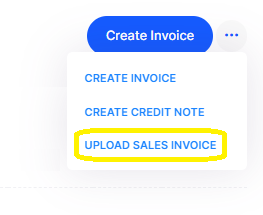
Here, instead of clicking the 'Create Invoice' button, you can click the '...' button right next to it. Once expanded, you can then click 'Upload Sales Invoice' as shown within the yellow border below:
Once here, you'll then be able to drag and drop the invoice or click to upload it:

Tip: you will need to do this one-by-one - but we can bulk upload these via a CSV/excel file, so email us if you have multiple invoices to upload and need our support with this.
This will then scan the invoice for the relevant information (e.g. description, unit price, VAT etc.) and create the invoice for you to approve. As with any OCR technology, it won't always be 100% correct, so please do scan over the draft invoice to ensure the information is correct.
If you have any issues or questions with this, please let us know (support@mightyaccounting.com).
FAQs:
My upload failed, what could be the reason for this?
The most common reason for a file upload failing is due to the invoice being across multiple pages. If this is the case, please only upload the first (or relevant page). If this isn't the case, please send over the invoice to us (support@mightyaccounting.com) and we can take a look for you.
Can I upload multiple sales invoices?
Not yet, but we will hopefully be rolling out this functionality soon, as well as the ability to upload CSV/excel files with invoices (which helps if you are migrating systems and can export the invoices in this format). However, in the meantime, if you do need to upload multiple sales invoices, please email them over (support@mightyaccounting.com) and we'll be happy to upload them for you.