

How to Recharge Expenses to Your Client
Sometimes you’ll incur costs while working on a contract, maybe train tickets, subsistence, or materials, and your client has agreed to reimburse you. In Mighty, we’ve made it easy for you to log when an expense will be recharged to a client, and then quickly add this onto your next sales invoice.
How to recharge expenses in Mighty
Step 1: Mark the expense or bank transaction as “to be recharged to a client”
For expenses you’ve paid for through the business bank account, you’ll see a tick box on the categorisation screen:
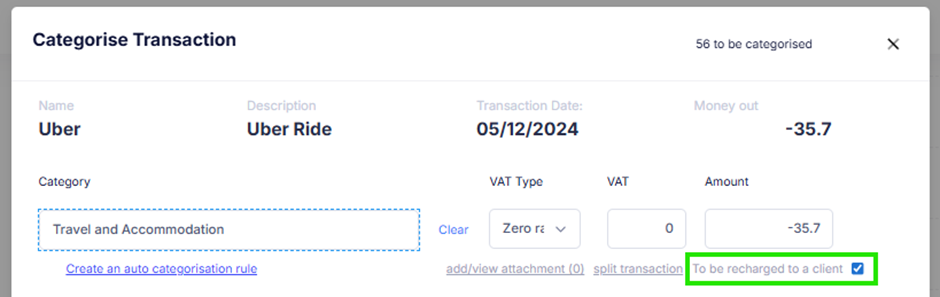
Alternatively, if you use Mighty's Post Box, you can also preemptively tick recharge to your client there too.
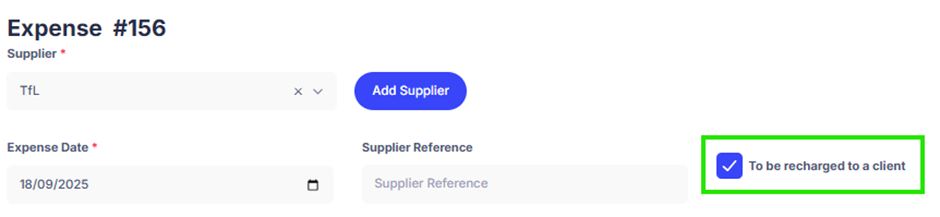
For expenses you’ve incurred personally, you’ll find a tick box on the expense claim screen for this:
Step 2: Add these expenses onto your sales invoice
When creating an invoice, you’ll notice there’s a ‘Add expense line’ option, as shown below:
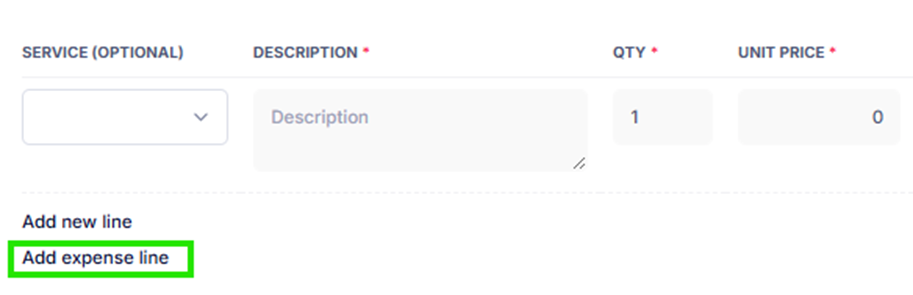
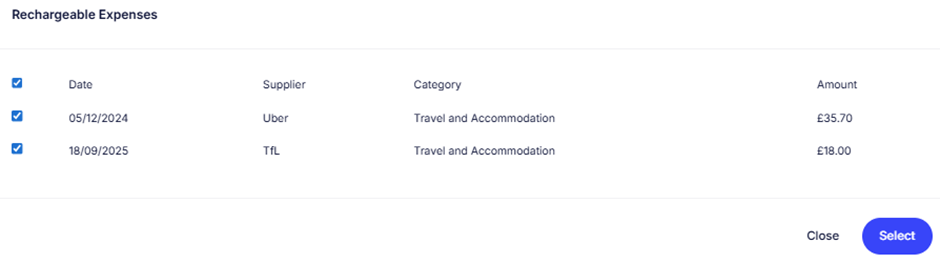
If you click this, you’ll then be able to select the expenses you want to add (or select all, if appropriate):
Not VAT registered? That’s it. You simply recharge the cost to your client, and you can skip the VAT guidance below. If you’re VAT registered, please read on!
VAT on recharged expenses
If you are VAT registered, here’s what to know:
- Recharges are part of your supply. Therefore, you usually need to add VAT when you invoice your client, even if the original expense didn’t have VAT on it. So, if your client has agreed to reimburse you for travel, subsistence etc. then you would charge VAT on this expense.
- Disbursements are different. These are costs you pay purely as an agent on behalf of your client that they will be utilising. So, for example, if you purchased some software on behalf of your client, this would be a disbursement and you wouldn’t add VAT.
HMRC has some additional guidance on this here.
So that’s HMRC’s rules covered, however, different clients will have different policies when it comes to recharging expenses and VAT. As stated above, you need to charge VAT on expenses unless it’s a disbursement, which is rarer.
Therefore, if you incurred a £42 train ticket that your client has agreed to reimburse, you would typically include this on an invoice where you charge £42 + VAT (e.g. £50.40 in total), even though the train expense itself wouldn’t have had VAT on it.
However, some clients, especially bigger corporates, will ask you to always treat expenses as VAT inclusive. That means if you recharge this £42 train ticket, £42 would be treated as the gross amount, and you would be instead invoicing £35 + VAT (£42 gross), as you are accounting for VAT within the £42. So, to summarise:
- VAT inclusive: you’ll usually end up a little out of pocket, because the VAT you owe HMRC comes out of the amount your client pays you.
- VAT exclusive: you add VAT on top, so you recover the full amount.
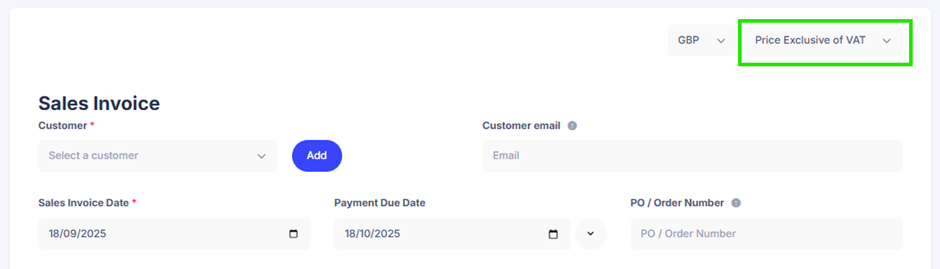
Similarly, if you recharge business mileage to a client, this would usually also be subject to VAT. In Mighty, it’s easy to toggle between these when recharging expenses, as in the top right of the sales invoices screen, there is a drop down for ‘Price Exclusive of VAT’ and ‘Price Inclusive of VAT’, as shown in the green box below:
Things to keep in mind
- Invoicing VAT on top of the full expense amount (e.g. treating it as VAT exclusive) is the most beneficial way to recharge expenses. However, keep in mind that some clients may push back on this.
- Keep clear records of your original receipts as HMRC can ask to see them.
- If in doubt, treat something as a recharge (with VAT) rather than a disbursement. Only treat it as a disbursement if it clearly meets HMRC’s criteria.
- Recharges count towards your VAT registration threshold if you’re not already VAT-registered.
If you have any questions with this, please reach out to your dedicated accountant or email support@mightyaccounting.com.